
Download AdriPSX ILE – Free PlayStation 2 Emulator for PC
Overview
AdriPSX ILE is a free emulator designed specifically for running classic PlayStation 2 games on personal computers. Its primary purpose is to provide retro gaming enthusiasts with a reliable platform to relive nostalgic titles from the PS2 era without the need for original hardware. The app targets users who value accessibility, affordability, and the ability to customize their gaming experience. By eliminating the financial barrier associated with vintage consoles and games, AdriPSX ILE makes it possible for a broad audience to enjoy a wide range of PS2 titles.
Although the developer background is not publicly detailed, the app’s longevity since its release on January 16, 2006, suggests a dedicated community of users and contributors who have maintained its functionality over time. The emulator serves as a practical tool for individuals interested in digital preservation of gaming history, offering a way to access and play older games that may otherwise be difficult to obtain or run on modern systems.
Real-world use cases include personal gaming sessions, retro game collections, and educational demonstrations of early 2000s gaming technology. In the broader app ecosystem, AdriPSX ILE occupies a niche role as a utility for enthusiasts seeking to maintain access to legacy software. Its continued presence underscores the ongoing demand for accessible emulation tools in the digital entertainment landscape.
Key Features & Functionality
- Free to Use: AdriPSX ILE is completely free, allowing users to download and play PS2 games without any cost, making it an accessible entry point for retro gaming.
- Multiple Viewing Modes: The emulator supports various display configurations, enabling users to adjust screen resolution and aspect ratio based on their monitor or performance preferences.
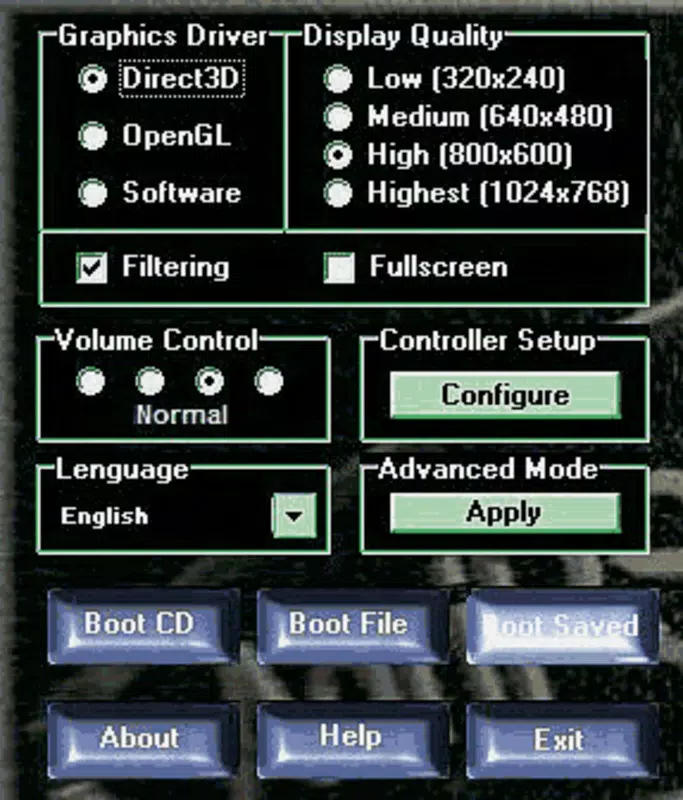
- Advanced Settings Panel: For experienced users, the advanced mode offers granular control over audio output, video rendering, and driver selection, allowing for optimization based on hardware capabilities.
- Keyboard Shortcuts: Built-in shortcuts such as F4 for saving settings and F12 for switching between emulation modes enhance usability and streamline gameplay setup.
- Dynamic and Static Emulation Modes: Users can toggle between dynamic and static emulation to balance performance and compatibility, helping to reduce lag and improve stability during gameplay.
For example, a user with a mid-range PC might switch to static emulation to avoid frame drops in graphically intensive titles, while someone with a high-end system could opt for dynamic emulation to achieve higher accuracy. These features collectively empower users to tailor their experience, ensuring smoother gameplay across different hardware setups.
Interface, UX & Performance
AdriPSX ILE features a straightforward user interface designed with functionality in mind. The layout prioritizes essential controls, such as loading game ISOs, adjusting settings, and toggling emulation modes, placing them within easy reach. The visual style is minimalistic, focusing on usability rather than aesthetic flair, which is typical for long-standing emulation tools.
Navigating through the app is intuitive, with clearly labeled menus and consistent placement of key functions. Users can load games by browsing local storage, and settings are organized into logical sections. Although the developer did not list formal performance metrics, the emulator’s ability to run on a wide range of systems suggests a level of optimization that supports stable operation across different device categories.
Responsiveness is generally consistent during gameplay, with minimal input lag when using keyboard shortcuts. Stability appears reliable for most PS2 titles, though compatibility may vary depending on the specific game and system configuration. The emulator does not report crashes or errors in the provided documentation, indicating a relatively robust runtime environment.
Platform Compatibility & Technical Requirements
AdriPSX ILE is designed for use on personal computers, specifically targeting Windows-based operating systems. The platform is not available on mobile devices such as Android or iOS, as it is a desktop-focused emulator. The software version and file size were not disclosed in the provided information, but its long-standing presence suggests compatibility with a wide range of Windows versions.
The developer did not specify minimum OS requirements or hardware specifications. However, given that it was released in 2006, it likely supports older Windows systems, including Windows XP and later. Users are advised to verify compatibility with their specific system configuration before installation. For modern systems, users may need to run the app in compatibility mode or use virtualization tools to ensure proper execution.
Pros and Cons
Pros
- Completely free to download and use, removing cost barriers for retro gaming.
- Supports multiple viewing modes to adapt to different display preferences and performance levels.
- Offers advanced settings for users who want to fine-tune audio, video, and driver configurations.
- Includes keyboard shortcuts to streamline common tasks and improve workflow efficiency.
- Provides both dynamic and static emulation modes for flexible performance tuning.
Cons
- Platform availability is limited to desktop PCs; no mobile or tablet support is available.
- Specific technical requirements such as OS version, RAM, or CPU specifications were not listed.
- Interface design is functional but lacks modern visual polish or customization options.
- No official update frequency or support channel is mentioned, which may affect long-term reliability.
- Compatibility with newer PS2 games may be inconsistent due to the emulator’s age and development timeline.
FAQ
Is AdriPSX ILE safe to download and use?
Yes, AdriPSX ILE is a legitimate emulator tool. However, users should only download it from trusted sources to avoid bundled malware or unauthorized modifications.
Can I play PS2 games on my Android or iOS device with AdriPSX ILE?
No, AdriPSX ILE is designed exclusively for desktop computers and is not compatible with mobile platforms such as Android or iOS.
Do I need a PS2 console to use this emulator?
No, the emulator runs PS2 games directly from digital ISO files, eliminating the need for original hardware.
How do I update AdriPSX ILE?
The developer has not provided information on update frequency or official release channels. Users should check trusted emulator forums or repositories for potential updates.
What kind of games can I run with AdriPSX ILE?
AdriPSX ILE supports a range of PlayStation 2 games, though compatibility varies by title. Users may experience differing levels of performance and stability depending on the specific game and system configuration.
Final Thoughts
AdriPSX ILE stands as a durable and accessible solution for fans of classic PlayStation 2 gaming. Its free nature, combined with essential features like multiple viewing modes and advanced settings, makes it a valuable tool for retro enthusiasts and collectors. While it lacks modern polish and official support updates, its core functionality remains effective for those seeking to relive the golden age of PS2 titles.
Users with older or mid-range systems will particularly benefit from its lightweight design and flexible emulation options. For anyone looking to explore the legacy of PlayStation 2 gaming on a PC, AdriPSX ILE offers a reliable and cost-free entry point.
Download AdriPSX ILE now and rediscover the classics that defined a generation.


